DMF
For files in standard data entity formats — customer groups, vendors, released products — there is nothing to parse: Microsoft's data entities already implement both the reading and the business logic. Here DMF is simply one more way to process an incoming file. DEVIntegProcessDMF runs a DMF import project as the processing step of a normal inbound message — about a hundred lines of code, and no staging tables or parser of your own.
What the wrapper adds on top of a plain recurring DMF import:
- the file becomes an Incoming messages record with the payload attached, the framework's status model, and an error log,
- multicompany execution — one message type imports into many companies,
- the run is monitored in the workspace next to every other integration.
The file format itself is whatever the DMF project defines — CSV, Excel, XML — and the column mapping lives in the DMF source-to-target mapping, not in code.
Because the import runs through the DMF service, this is best treated as a prototyping option rather than the end state — see When to use it below.
Setting up
Create an Inbound message type with DEVIntegProcessDMF as the processing class, the usual read and archive folders, and one operation parameter: Entity ref, which points at a processing group and entity in the Data management module.
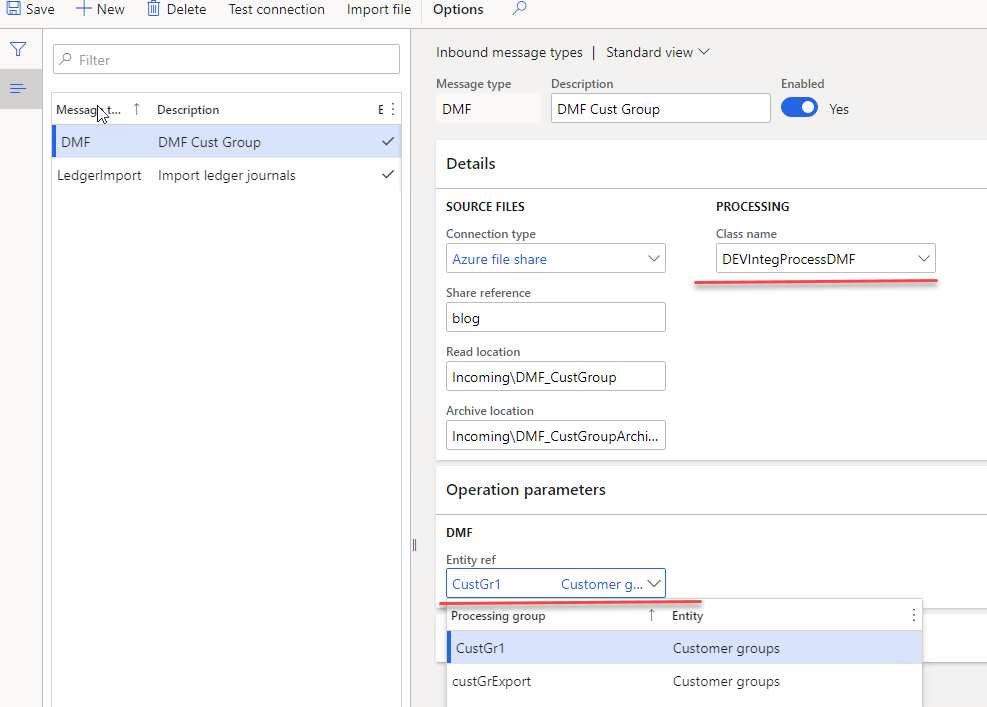
The same processing class serves any number of message types — one per entity, each with its own incoming folder.
Multicompany
The target company comes from the file name: everything before the first underscore. USMF_CustGroups01.xlsx imports into USMF, DEMF_CustGroups01.xlsx into DEMF, from the same folder and the same message type. A name without an underscore, or with a company that does not exist, fails the message with a clear error rather than importing into the wrong ledger.
How it runs
- The Load job picks the file up and creates the message, exactly as for any other format.
DEVIntegProcessDMFreads the company from the file name and switches to it.- The payload is pushed to temporary storage, and a new DMF execution is created from the configured definition group, with the file as its source.
DMFStagingWriter::executeruns the import synchronously — the same code path as Import now in the Data management module.- The framework reads the execution back: record count and error counts go onto the message, and the execution ID is stored as the message's document description, so the standard DMF execution history is one click away.
DMFExecutionId executionId = DMFUtil::setupNewExecution(definitionGroupEntity.DefinitionGroup);

// point the execution at the uploaded file, then run it
DMFStagingWriter::execute(executionId,
                          0,                                              // _batchId
                          true,                                           // _runOnService
                          false,                                          // _calledFrom
                          DateTimeUtil::getUserPreferredTimeZone(),
                          false);                                         // _compareData

messageProcessResult.setErrorCount(execution.StagingErrorCount + execution.TargetErrorCount);
messageProcessResult.setProcessedCount(execution.NoOfRecords);
What errors look like
Connection errors behave as for any other message type — the batch job fails, and Test connection on the message type confirms when the folder is reachable again.
Format errors — a renamed or missing column — surface as a DMF error on the message. Be prepared for this to be less informative than a custom parser: DMF reads Excel through a data integration component whose messages are generic, and a bad file can take about a minute to fail.
Data errors — values that do not exist — set the message to Error with the counts filled in. The detail is in the standard DMF execution history, which highlights the offending column on the offending row:
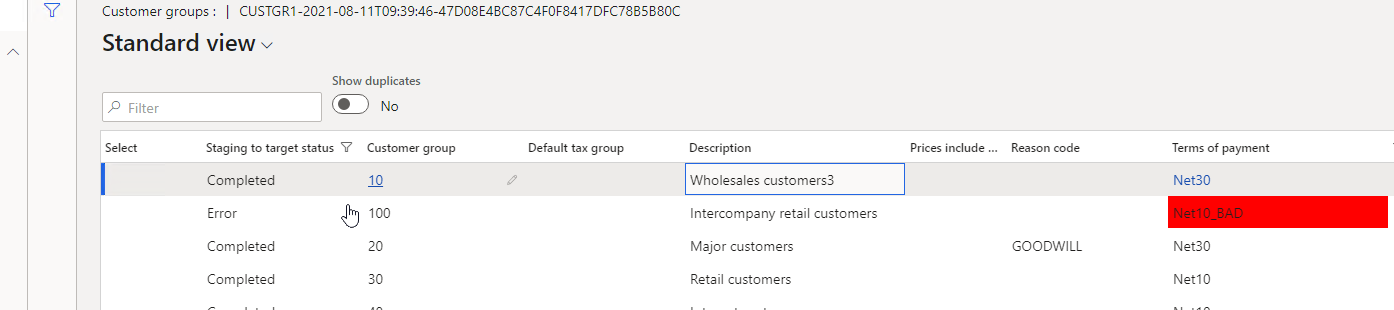
The important caveat: DMF does not run in a transaction, so there is no all-or-nothing. In the file above, the valid rows were imported and one row failed. A custom CSV or Excel import can guarantee that a document is created completely or not at all; a DMF import cannot. For master data that is usually acceptable, and for multi-line documents it usually is not.
Exporting
The wrapper covers import only. For outbound data in entity shape, the simplest route is a periodic export with DEVIntegExportBulkSQL reading the entity view directly — no code, and the file lands on SFTP or a file share with the framework's logging:
SELECT CUSTOMERACCOUNT, ORGANIZATIONNAME, PRIMARYCONTACTEMAIL FROM CUSTCUSTOMERV3ENTITY
For anything more complex, write the export in X++ — see CSV or JSON.
When to use it
Treat this as a prototyping and proof-of-concept option. A message type takes minutes to set up, with no staging tables, no parser, and no class of your own — ideal for proving out a connection, a folder structure, and a file layout before any code is written.
For production, weigh it carefully. The import depends on the DMF service: no transactions, so a file is never all-or-nothing; vague errors from the data integration component; and a delay before a bad file even fails. A "no code" import can end up costing more support effort than a custom one.
Switching later is cheap, because the connection, folders, message log, and monitoring belong to the framework, not to DMF — replacing DEVIntegProcessDMF with a custom class changes nothing users or administrators see. Write the import in X++ (CSV, Excel, XML, or JSON) when the interface goes live. See vs DMF for the full comparison.
Tutorial
- Multicompany DMF integration in Dynamics 365 FinOps using X++ — the complete setup with an Excel customer group import, the multicompany file naming, and each error type as the user experiences it.