Monitoring workspace
Form: DEVIntegWorkspace
The External Integration workspace is the single monitoring dashboard for all integrations built with the framework.
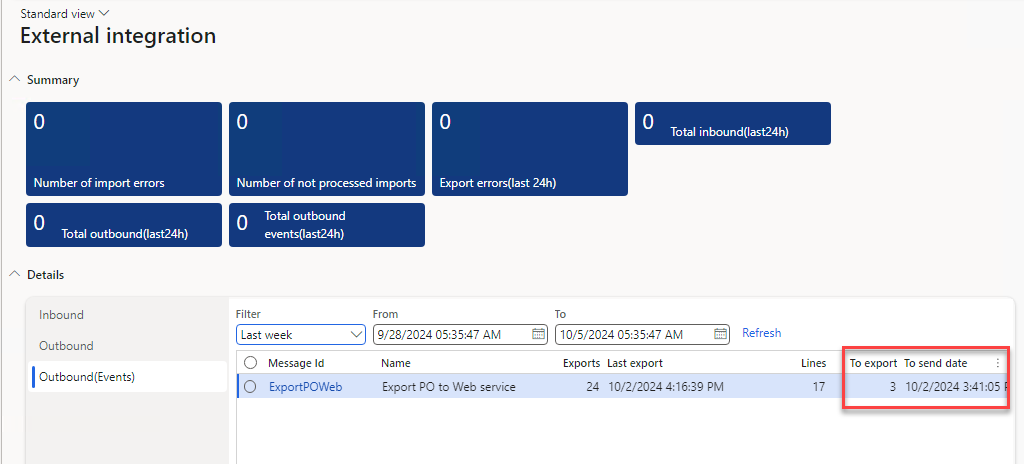
It combines:
- KPI tiles — count of inbound messages in Error status, messages not processed yet, and outbound documents not exported (
DEVIntegWorkspaceMessageErrorTile,DEVIntegWorkspaceMessageNotProcessedTile,DEVIntegWorkspaceExportMessageErrorTile). - Session lists — recent import sessions, full (bulk) export sessions, and incremental export sessions for a selected period, with volumes and durations (
DEVIntegWorkspaceImportSessionsFormPart,DEVIntegWorkspaceExportFullSessionsFormPart,DEVIntegWorkspaceExportIncSessionsFormPart).
A support engineer opens this workspace in the morning and immediately sees which interface needs attention; every tile drills down to the corresponding message log or export log.
For alerting outside D365FO, combine the workspace with standard alert rules on the underlying tables — for example on message status Error, on the Processing attempts counter, or on an outdated Last date time of an incremental load. Typical monitoring setups are described in the event-based export tutorial and the sales order import tutorial.