Integration project guide
A production integration is much more than moving data between two systems. Most of the work is agreeing what the data means, deciding how updates and errors should be handled, testing realistic scenarios, and ensuring that every message can be traced after go-live.
A demonstration may create a sales order in a few minutes. On a real project, however, a sales-order integration can require weeks of work between business users, consultants, developers, and the external system team.
The External Integration framework gives these teams a repeatable five-step process. It provides templates and built-in tools for logging, error handling, testing, and monitoring, while the project team defines the business rules.
You have identified a business process that must exchange data between D365FO and another system.
Step 1. Define what the integration must do
Organise a kickoff meeting with the business owners and the people responsible for both systems. The purpose of the meeting is to create one shared integration solution specification.
Use the Integration solution specification as a questionnaire. Each answer can change the integration design, so these decisions should be recorded early.
First, agree which integration flow is required:
- Scheduled inbound — D365FO regularly imports documents or other data.
- Scheduled outbound — D365FO regularly exports a group of records.
- Event-based outbound — D365FO sends an individual document when a business event occurs.
- Real-time service — one system requests information and waits immediately for a response.
Then record the following decisions:
- Business purpose and owner: Why is the integration needed, and who owns the process?
- Documents and direction: What is sent, what is the document called in each system, and which system sends it?
- Timing and volume: Is data sent immediately or on a schedule, how quickly must it be processed, and how many messages and lines are expected during normal and peak periods?
- Communication channel: Will the systems use files, Azure Service Bus, SFTP, a REST API, or another method?
- Updates and duplicates: Can a document change after it becomes available to the integration? How is the same document recognised, and what should happen if it is received twice? Ideally, the source system should expose only finalised documents; this avoids most update cases.
- All or nothing: If one line is invalid, is the whole document rejected or do the valid lines continue? This answer can determine the integration design because processing a complete multi-line document as one unit requires transaction support.
- Availability and security: What happens when either system is unavailable, and which messages can be retried automatically.
- Testing: Who can provide realistic test messages and data? Does the test data resemble production data, or is it artificial?
Ask whether one person can validate the whole flow: create a document in one system, log in to the other, and check the result. If this is possible, a test can take minutes instead of a day of emails between teams. At the kickoff, agree who will provide access and which test data may be used.
Deliverable: an approved integration solution specification, named owners, and an agreed test approach.
Step 2. Agree how the data will be mapped
The field mapping document is a key integration document that defines how information from the external system becomes information in D365FO.
Create it during a working session between the two system teams. Start with the reusable field mapping template, and use the completed sales-order mapping as an example.
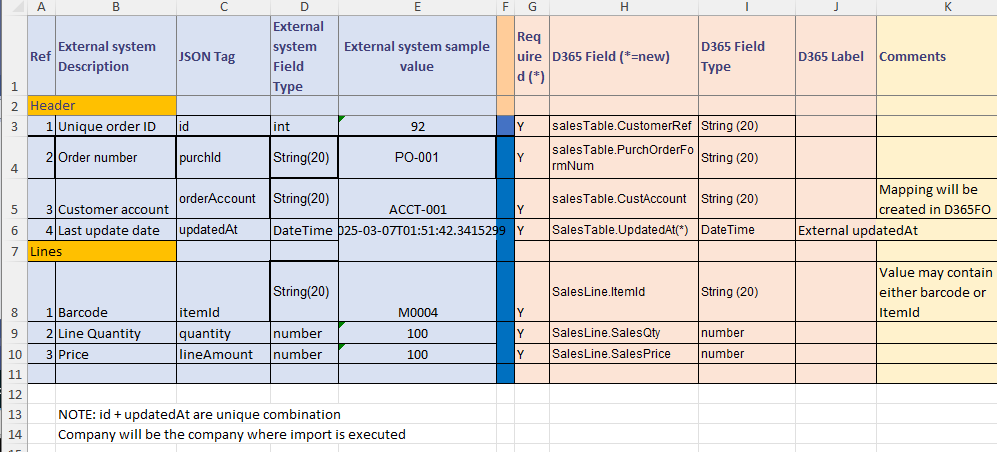
For every field, record:
- its business meaning and a realistic sample value;
- whether it is required or optional;
- the source field and the D365FO destination field;
- its data type and maximum length;
- any default value, conversion, validation, or rounding rule;
Also agree how to handle these common differences:
- Mapping approach: One system may use US as a country code, while another uses USA. As a general rule, the receiving system should translate external values into its own valid values because it owns the destination rules. The teams must still agree who maintains each mapping.
- Duplicate messages: Record the unique identifier, whether a repeated message should be ignored, rejected, or treated as an update, and which updates are allowed.
- Different field lengths: If D365FO allows 60 characters but the source can send 100, decide whether to reject or shorten the value, extend the D365FO field, or store the information elsewhere.
Deliverable: an approved field mapping containing realistic samples, business rules, and named owners for every open question.
Step 3. Build the integration
Development starts with three inputs:
- the required integration type;
- the approved field mapping document;
- a representative sample file or message.
Using these inputs, the documentation on this site, and the provided working examples, a developer can create a working integration class in the External Integration framework.
The documentation and consistent examples are designed to make this process as AI-friendly as possible. A coding assistant can use the three inputs and the closest example to generate the initial implementation, which a developer then reviews and tests.
Deliverable: a working integration class and message type that implement the approved rules and can be tested with sample data.
Step 4. Test the integration
External Integration messages can be tested in manual mode directly in D365FO, without connecting to the external system. Load a sample file or enter the message text through Manual load, then process it in the same way as a live message.
During joint testing, the Incoming messages list and integration logs show what each system actually sent, received, and processed. A consultant can download the original message and its processing log and give them to a developer, who can replay exactly the same message in a development environment. This ends the common integration "blame game": a claim such as "D365FO sent us incorrect data" can be checked against the stored message.
Deliverable: a manually tested integration and detailed logs for final testing.
Step 5. Test volume and performance
If the integration has performance requirements, start basic testing as soon as development is complete. A common mistake is waiting for a separate environment or a full production-sized dataset. Early high-level checks can already provide a useful performance estimate. For example, creating or posting complex documents such as sales or purchase orders is often around 1 line per second, while simpler documents such as ledger journal lines may process around 10 lines per second.
Measure the processing time for one representative message. Then test parallel processing: if four import threads run at the same time, can they process nearly four times as many messages, or do they block or slow each other down?
External Integration logs the duration and number of lines for every message. It also provides sample classes for generating large test datasets. See D365FO Performance: Periodic import of one million ledger journal lines for an example.
Deliverable: an early performance estimate and a result for parallel processing.
The result
The External Integration framework provides the templates and operational tools at each step, helping the team deliver a D365FO integration that is reliable, traceable, and easy to support.