Inbound
An inbound message type brings external data into D365FO. Every file, queue item, or API response becomes a record in the Incoming messages log with the payload attached, then a processing class turns it into a D365FO document.
How it works
- A Load batch job reads the source (file share, queue, or web service) and, for each item, creates a record in Incoming messages with status Ready and the payload attached. Files are moved to an Archive folder — there is no error folder, because failures stay visible in the message log.
- A Process step calls your class's
processMessage()for each unprocessed message. It runs outside a transaction, so the class decides the transaction boundary — one per message, per journal, or per line. - Processing is two steps: first parse the payload into a staging table, then create the D365FO document from staging. The message ends as Processed, or Error with a log.
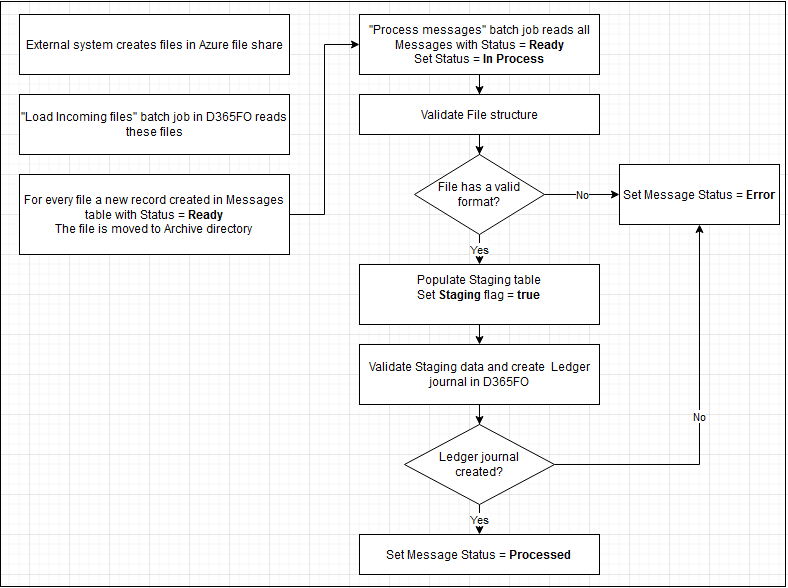
The two-step staging is what makes the framework supportable: when processing fails, the parsed values sit in staging where a user can inspect them, fix the cause (create the missing master data or a mapping), and reprocess — all from the message log, no developer needed. A message can also be set to Hold when a user decides not to process it.
Setting up and running
Configure the message type
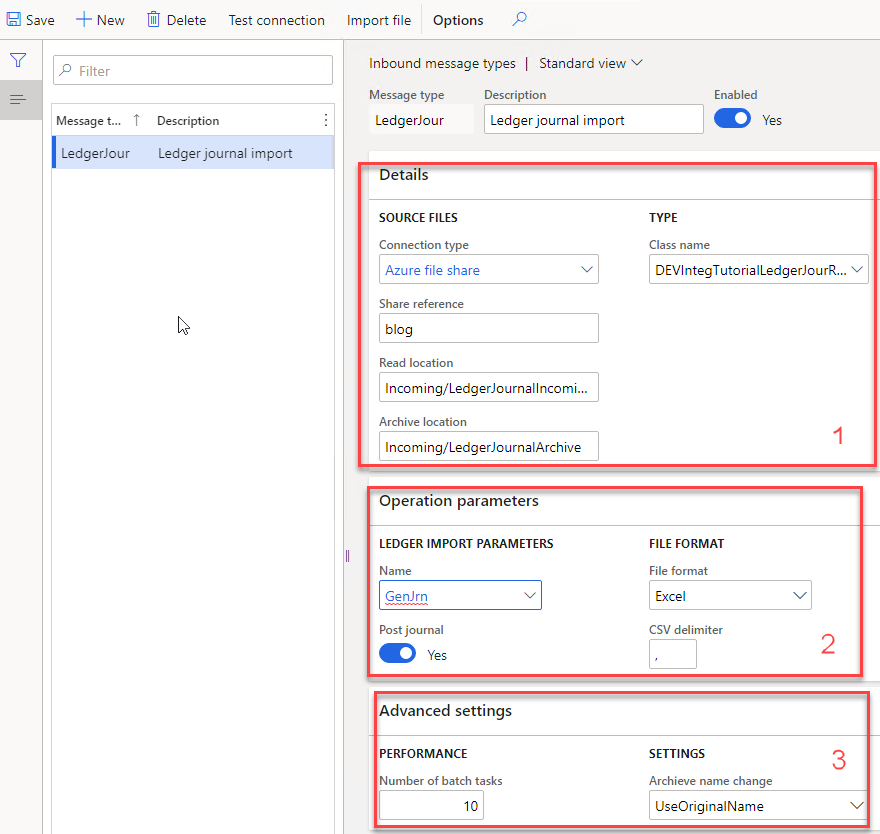
In Inbound message types, set the Details (incoming and archive folders, and the processing class), any Operation parameters the class needs — for example a journal name, an auto-post flag, or the file type — and Advanced options such as parallel processing:
Run and monitor
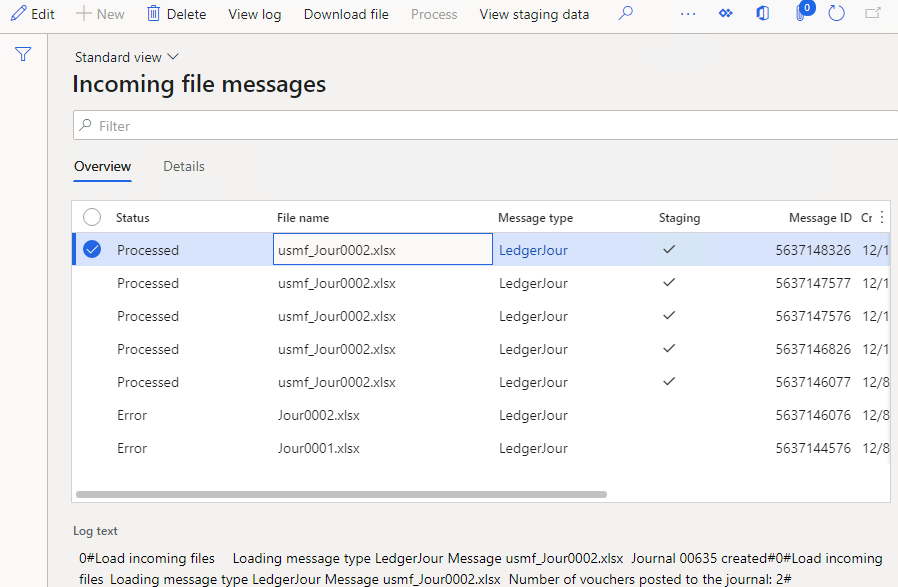
The Load operation reads the source and creates messages; Process turns them into documents (Load can run processing straight after). Both run as batch jobs. Every message — with its payload, status, statistics, and error log — is on the Incoming messages form, where you filter by status, view the file, view the staging data, or reprocess:
Import file on the message type loads a single file straight from your PC for testing, without a live connection.
Building the process class
An inbound class extends DEVIntegProcessMessageBase and implements one method, processMessage, called once per message outside a transaction. The public sample DEVIntegTutorialImportLedgerJournal reads a CSV/Excel file into staging and creates a ledger journal:
class DEVIntegTutorialImportLedgerJournal extends DEVIntegProcessMessageBase
{
    void processMessage(DEVIntegMessageTable _messageTable, DEVIntegMessageProcessResult _messageProcessResult)
    {
        messageTable         = _messageTable;
        messageProcessResult = _messageProcessResult;

        if (! messageTable.IsParsed)   // step 1 — parse the payload into staging
        {
            ttsbegin;
            delete_from stagingHeader where stagingHeader.MessageId == _messageTable.RecId;
            this.readFileToStaging();
            ttscommit;
        }

        this.createDataFromStaging();  // step 2 — build the document from staging
    }

    public str getDescription()
    {
        return "Ledger journal import CSV sample";
    }
}
Parsing reads the payload with a format-agnostic reader and writes staging rows:
DEVFileReaderBase fileReader = messageTypeTable.openFileReader(messageTable.getFileStream());
fileReader.readHeaderRow();

while (fileReader.readNextRow())
{
    stagingLine.clear();
    stagingLine.MainAccount = fileReader.getStringByName('MainAccount');
    stagingLine.Amount      = fileReader.getRealByName('Amount');
    stagingLine.insert();
}
messageTable.IsParsed = true;   // a reprocess then skips straight to document creation
Creating the document validates staging (counting errors on messageProcessResult) and builds the target — here a ledger journal through LedgerJournalEngine, optionally posted. Throwing an exception marks the message Error and rolls back that step.
Any payload format
openFileReader handles CSV and Excel; the same two-step shape covers other formats by swapping the parse step:
- JSON — deserialize with
FormJsonSerializer(sampleDEVIntegTutorialImportSalesTableJSON). - XML — read with
System.Xml(sampleDEVIntegTutorialProcessPurchConfirmXML). - REST / web — poll an endpoint; a large result is split into parent/child messages with
initChildMessage()(sampleDEVIntegTutorialWebSalesProcess). - PDF via AI — an LLM extracts the fields (sample
DEVIntegTutorialPurchOrderOCRProcess). - Standard entities via DMF — no custom class; see DMF.
Error handling
Because processing runs outside a transaction and always leaves evidence, the common failures each have a clear resolution — all from the message log:
| Failure | What the user sees | How to fix it |
|---|---|---|
| Format — file can't be read | Error, no staging | Send the file to a developer, or return it and set Hold |
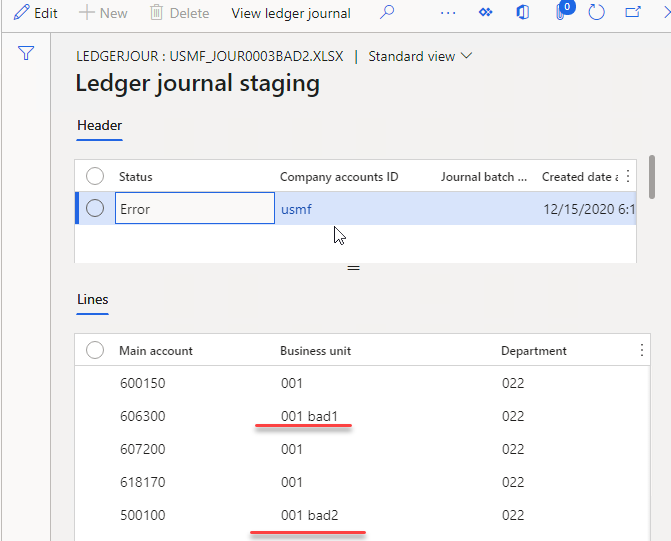
| Data — values don't exist | Error, staging populated | Create the missing master data or a mapping, then reprocess |
| Posting — e.g. unbalanced journal | Error, document not posted | Fix the data and reprocess |
| Wrong result — document looks wrong | Processed | Inspect the staging data to see exactly what was read |
Tutorials
- File-based integration for ledger journals — the foundational walk-through: CSV/Excel from Azure File Share, staging, and the four error types.
- Azure Service Bus integration — sales orders from JSON queue messages.
- Import purchase orders from XML files — XML documents from a file share.
- Import sales orders from an external web application — incremental REST polling, parent/child messages, mapping, full traceability.
- Import purchase orders from PDF using AI — LLM-based document recognition.
- Multicompany DMF integration — the DMF variation described above.
- Performance: one million journal lines — parallel processing at scale.