Outbound Event-based
An event-based outbound message type exports one document per business event: a purchase order confirmation, an invoice posting, a shipment. The document class extends DEVIntegExportMessageBase.
How it works
- At posting time — for example, when a purchase order is confirmed — a record is created in the Export document log with status To send. Nothing is built or sent yet.
- Later, at export time (not when the event happens, unlike Business Events), the payload is built and sent, and the response is processed — for example, the ID returned by the web service is saved back on the document.
- Both success and failure are logged. With full logging the exact message body is saved too, and the Document ID shows the complete send history of one document.
There is one log record per document, so confirming the same document twice does not create two records — it reuses the single log record and sets its status back to To send. If an export fails, the record stays in To send and gets an error log — so you can alert on records that stay there too long.
The export runs as a separate step, after posting:
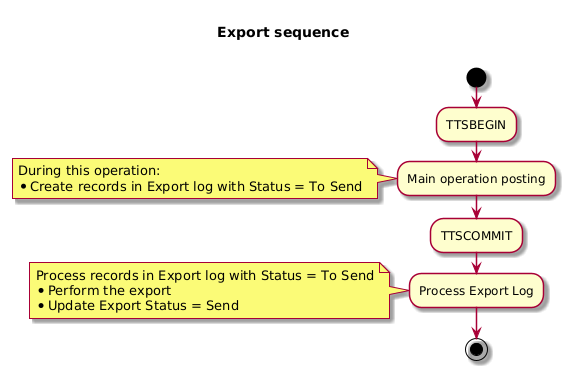
It can run immediately in the user session — where the result is shown to the user right away — or later through the Export messages from log batch job, which processes every record still marked To send.
Setting up and running the export
Configure the message type
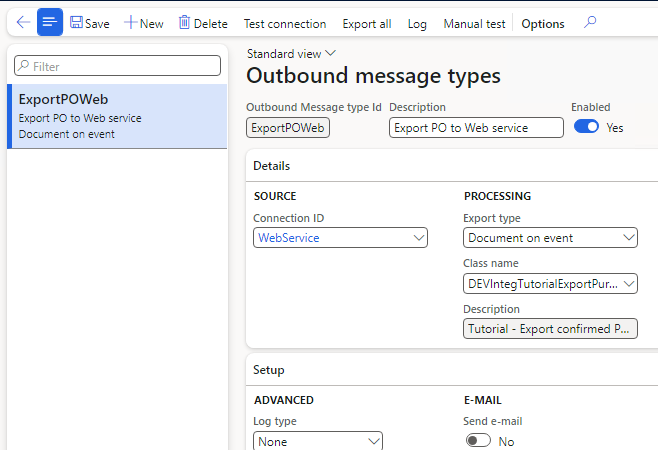
In Outbound message types, set Export type to Document on event, select the export class, and choose a connection defined under Connection types:
Export existing documents
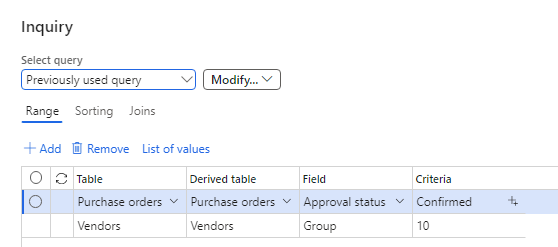
When you turn on an integration on a database that already has documents, use Export all to send those existing ones. It opens a standard query dialog where you choose exactly which records to mark:
Each matching document is added to the Export document log with status To send — nothing is sent yet:
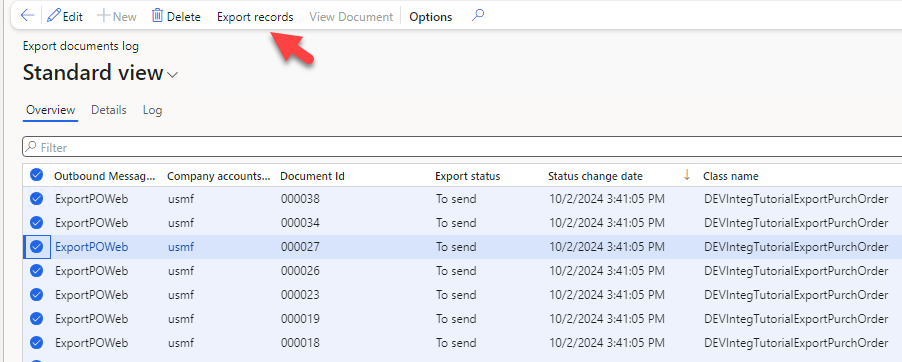
From there, the Export messages from log batch job — or the Export records button on the log — sends everything that is To send. For day-to-day use, new documents are sent automatically by the step that runs after posting.
Building the export class
An event-based message type is a single X++ class that extends DEVIntegExportMessageBase. The framework handles the rest — the Export document log, retries, batch processing, logging, and monitoring — so you write only the business logic: which documents qualify, what the payload contains, and where the response goes. The example below is the web-service sample DEVIntegTutorialExportPurchOrder, which exports confirmed purchase orders to a REST service via the REST connector.
The shared skeleton
Every export class has the same shape, whatever the transport. Here it is, trimmed to the essentials:
public class DEVIntegTutorialExportPurchOrder extends DEVIntegExportMessageBase
{
    public static DEVIntegTutorialExportPurchOrder construct()
    {
        return new DEVIntegTutorialExportPurchOrder();
    }

    // Eligibility: which records this message type should ever export
    boolean isNeedToCreateLog(PurchTable _purchTable)
    {
        boolean res;
        if (this.isMessageTypeEnabled() &&
            _purchTable.DocumentState == VersioningDocumentState::Confirmed)   // + your business filters
        {
            res = true;
            // one log per document — skip if it is already marked to send
            if (DEVIntegExportDocumentLog::sentRecordExists(_purchTable, messageTypeTableOutbound.ClassName))
            {
                res = false;
            }
        }
        return res;
    }

    // Create or refresh the "To send" log entry for one document
    public boolean insertFromPurchTable(PurchTable _purchTable)
    {
        boolean res;
        if (this.isNeedToCreateLog(_purchTable))
        {
            this.createLogFromCommon(_purchTable, _purchTable.PurchId);
            res = true;
        }
        return res;
    }

    // "Export all" — backfill existing documents through a query dialog
    public void exportAllData()
    {
        Query                query = new Query();
        QueryBuildDataSource qBDS;
        PurchTable           purchTable;
        int                  markedCounter;

        qBDS = query.addDataSource(tableNum(PurchTable));
        qBDS.addRange(fieldNum(PurchTable, DocumentState))
            .value(SysQuery::value(VersioningDocumentState::Confirmed));

        QueryRun queryRun = new QueryRun(query);
        if (queryRun.prompt())   // standard query dialog — the user scopes the records
        {
            while (queryRun.next())
            {
                purchTable = queryRun.get(tableNum(PurchTable));
                if (this.insertFromPurchTable(purchTable))
                {
                    markedCounter++;
                }
            }
            info(strFmt("%1 record(s) marked to export", markedCounter));
        }
    }

    public str getDescription()
    {
        return "Tutorial - Export confirmed Purch order";
    }
}
createLogFromCommon (from the base class) adds a record to the Export document log with status To send, linked to the source document — or updates the existing one, so confirming the same document twice never creates duplicates.
A data event handler marks the record when the business event happens. The actual send then runs after posting:
[DataEventHandler(tableStr(PurchTable), DataEventType::Updated)]
public static void PurchTable_onUpdated(Common sender, DataEventArgs e)
{
    PurchTable purchTable = sender as PurchTable;
    if (purchTable.DocumentState == VersioningDocumentState::Confirmed &&
        purchTable.orig().DocumentState != purchTable.DocumentState)
    {
        DEVIntegTutorialExportPurchOrder::construct().insertFromPurchTable(purchTable);
    }
}
Choosing the transport
The framework reads the connection type on the message type and calls the matching export method — a web service call, an Azure Service Bus export, or a file export. You write only the one you need.
Web service — exportWebMessage (sample: DEVIntegTutorialExportPurchOrder). Build a contract, send it through a custom load class, and process the response — here, the returned external ID is saved back on the PO. The class points to its load class by overriding getCustomLoadType to return a DEVIntegTutorialExportPurchLoad (which extends DEVIntegMessagesLoadBaseType and wraps the HttpClient):
public void exportWebMessage(DEVIntegExportDocumentLog _exportDocumentLog, DEVIntegMessagesLoadBaseType _loadCache)
{
    PurchTable purchTable = PurchTable::findRecId(_exportDocumentLog.RefRecId);

    DEVIntegTutorialExportPurchLoad exportPurchLoad = _loadCache as DEVIntegTutorialExportPurchLoad;
    exportPurchLoad.initConnection();

    DEVIntegTutorialExportPurchContractHeader contractData = new DEVIntegTutorialExportPurchContractHeader();
    contractData.initFromPurchOrder(purchTable);
    str sJSON = FormJsonSerializer::serializeClass(contractData);

    Num externalId = exportPurchLoad.postContract(sJSON, _exportDocumentLog.DocumentId);

    ttsbegin;
    purchTable = PurchTable::findRecId(_exportDocumentLog.RefRecId, true);
    purchTable.VendorRef = externalId;
    purchTable.doUpdate();
    ttscommit;
}
You only need a custom load class for a custom REST/SOAP endpoint. For Azure File Share and Azure Service Bus, the framework already provides the load class — you just build the payload.
Azure Service Bus — exportServiceBusMessage (sample: DEVIntegExportMessageTutorialSalesOrders). Build the message and send it with an optional label — no custom load class needed:
public void exportServiceBusMessage(DEVIntegExportDocumentLog _exportDocumentLog, DEVIntegMessagesLoadAzureServiceBus _loadCache)
{
    SalesTable salesTable = SalesTable::findRecId(_exportDocumentLog.RefRecId);

    DEVIntegTutorialExportSalesTableJSON contract = new DEVIntegTutorialExportSalesTableJSON();
    contract.parmSalesId(salesTable.SalesId);
    contract.parmCompanyAx(salesTable.DataAreaId);
    contract.parmMessageAction(this.getDescription());
    str json = FormJsonSerializer::serializeClass(contract);

    this.sendMessageServiceBusCache(_exportDocumentLog, _loadCache, json, salesTable.SalesId);
}
File (Azure File Share / SFTP) — exportFileMessage. Build a stream and pass it to sendMessageFileStorageCache with a generated file name — again, the framework provides the load class:
public void exportFileMessage(DEVIntegExportDocumentLog _exportDocumentLog, DEVIntegMessagesLoadBaseType _loadCache)
{
    SalesTable salesTable = SalesTable::findRecId(_exportDocumentLog.RefRecId);

    System.IO.MemoryStream stream = this.buildXmlStream(salesTable);   // your payload
    FileName fileName = _exportDocumentLog.generateFileName([salesTable.SalesId], 'SO_%d.xml');

    this.sendMessageFileStorageCache(_exportDocumentLog, _loadCache, fileName, stream);
}
Starting the export from code
Marking a record only sets it to To send; something has to start the actual send. To do that from code — usually right after the main operation finishes — collect the marked log records into a DEVIntegExportRecordList and pass it to DEVIntegExportDocumentsLog::exportRecordList().
For a single document, constructFromRecord builds the list in one call:
DEVIntegExportDocumentsLog::exportRecordList(
    DEVIntegExportRecordList::constructFromRecord(purchTable, classStr(DEVIntegTutorialExportPurchOrder)));
For several documents produced by one operation, collect their log records first, then send them together:
DEVIntegExportDocumentLog integExportDocumentLog;
DEVIntegExportRecordList  exportRecordList;

while select RecId from integExportDocumentLog
    where integExportDocumentLog.RefTableId == purchTable.TableId
       && integExportDocumentLog.RefRecId   == purchTable.RecId
       && integExportDocumentLog.ClassName   == classStr(DEVIntegTutorialExportPurchOrder)
{
    if (!exportRecordList)
    {
        exportRecordList = new DEVIntegExportRecordList();
    }
    exportRecordList.addExportLog(integExportDocumentLog.RecId);
}

if (exportRecordList)
{
    DEVIntegExportDocumentsLog::exportRecordList(exportRecordList);
}
Run this after the main operation, outside its transaction — a send failure then logs an error without rolling back the document. If you skip it, the records still go out with the next Export messages from log batch run. (You can also have the export class fill the list for you: set it on the instance with parmIntegExportRecordList() before marking, and every createLogFromCommon adds its record automatically.)
Tutorial
- Event-based exports to external web services — the full scenario: setup, initial export of existing documents, user-session vs batch export, error handling, tracing, monitoring, and performance testing.