Outbound Periodic
A periodic outbound message type produces a recurring bulk export — a daily on-hand file, a customer list, an EDI invoice batch. The export class extends DEVIntegExportBulkBase (a RunBaseBatch subclass), so it runs as a normal D365FO batch job and delivers through a connector such as SFTP or Azure File Share.
How it works
- The export runs on demand or on a batch schedule. Each run first writes a record to the Export log with status In progress.
- Your
exportData()method builds the payload — usually a CSV file, but it can also be a JSON message for a queue — using helper methods from the base class. - The file is delivered to the target folder (or the message to the queue). A Test run sends the file to your browser instead, so you can check the output without touching the server.
- The log is updated with the line count, duration, and final status — Done, Warning, or Error — which you can alert on.
Unlike event-based exports, a periodic export is stateless by default: each run rebuilds the whole dataset from a query. To send only what changed, use an incremental export.
Setting up and running the export
Configure the message type
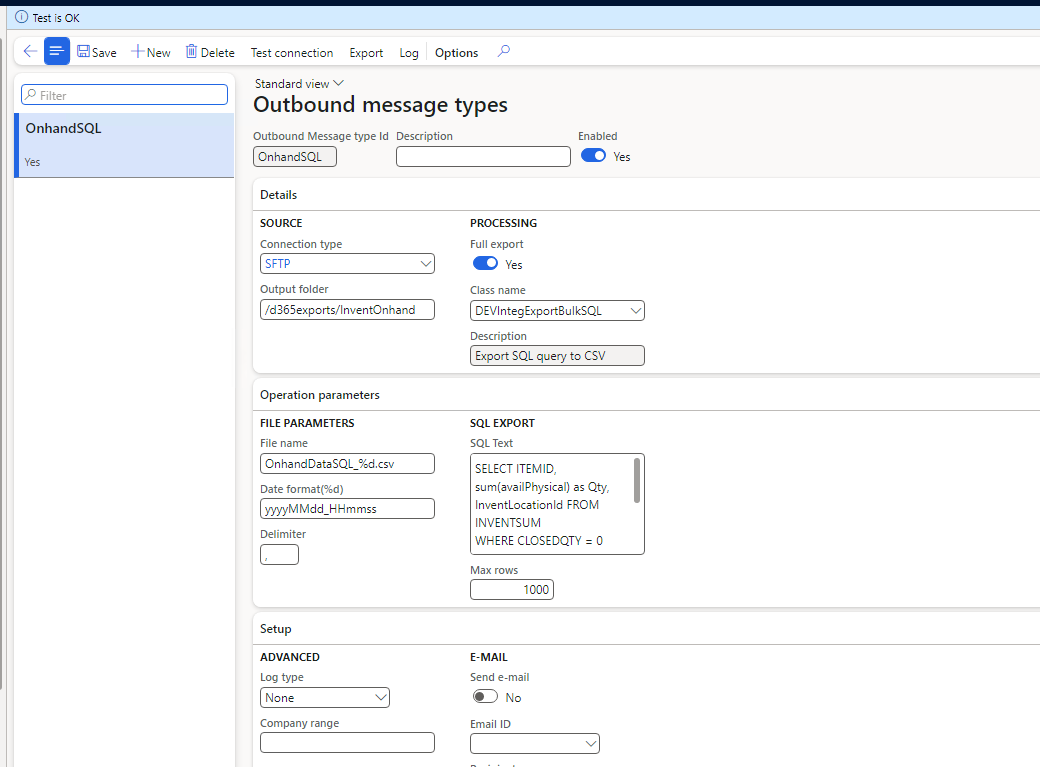
In Outbound message types, set the Source (connection type and target folder), the Processing class, and the File parameters — a file name with a %d date placeholder, its date format, and the CSV delimiter. The message type below is a no-code SQL export, so it also carries the SQL text:
Run it
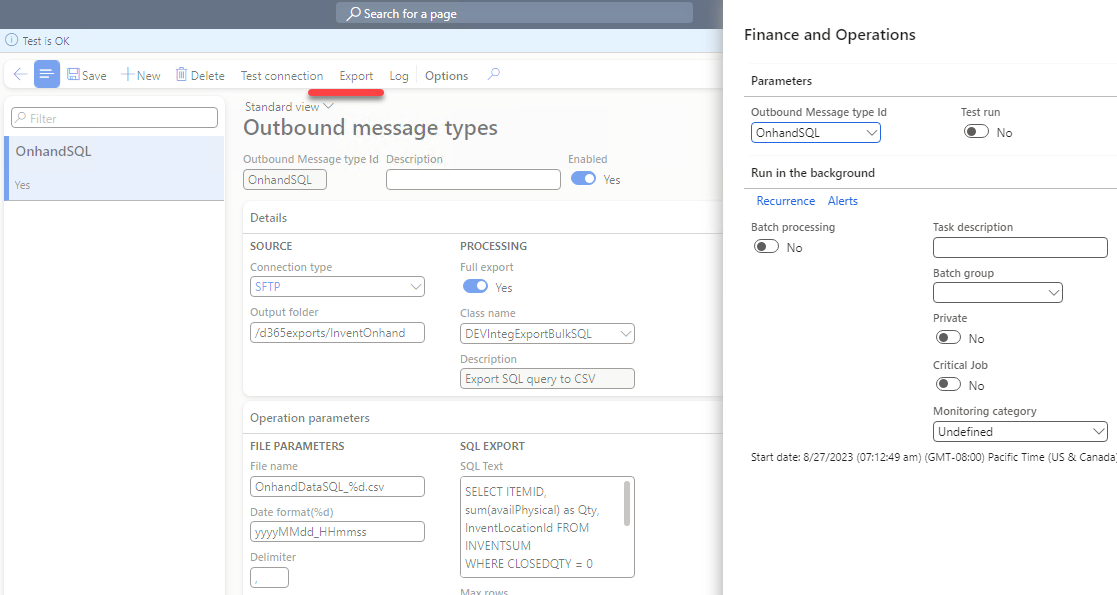
Export runs the job. It can go to a batch schedule (recurrence) for daily or hourly runs, or run once interactively. Tick Test run to send the file to your browser instead of the server — handy for checking output, and it does not advance an incremental export's state:
Test connection on the form lists the target folder, so you can verify the channel before the first run.
Monitor
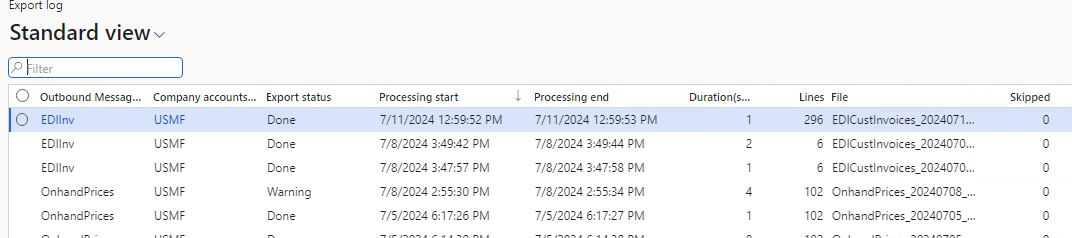
Every run is recorded in the Export log with its line count, duration, and status. Set a standard D365FO alert on Error or Warning rows:
Building the export
You can build a periodic export at three levels of effort. The first needs no code at all.
No code: a SQL statement or data entity
DEVIntegExportBulkSQL exports the result of a SQL statement set directly in the message type — no class to write:
SELECT ITEMID, sum(availPhysical) as Qty, InventLocationId FROM INVENTSUM
WHERE CLOSEDQTY = 0 AND DATAAREAID = 'USMF'
GROUP BY ITEMID, InventLocationId
HAVING sum(availPhysical) > 0
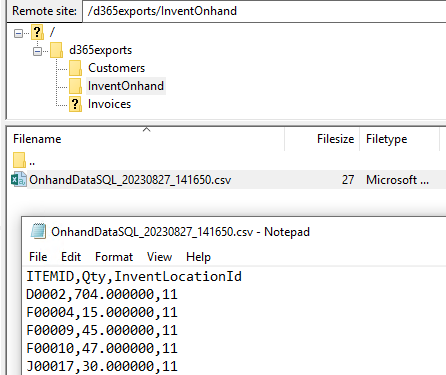
The same class works against a data entity view for entity-shaped exports without code — for example SELECT CUSTOMERACCOUNT, ORGANIZATIONNAME, PRIMARYCONTACTEMAIL FROM CUSTCUSTOMERV3ENTITY. The result lands in the target folder as a CSV:
This is great for prototyping; real exports usually need X++.
Simple X++: build the file in code
For custom logic, write a class that extends DEVIntegExportBulkBase and override exportData(). The base class provides the file helpers — initCSVStream, writeHeaderLine, writeDataLine, sendFileToStorage — so you write only the business logic. The public sample DEVIntegTutorialExportBulkInventOnhand exports on-hand quantities across all companies:
class DEVIntegTutorialExportBulkInventOnhand extends DEVIntegExportBulkBase
{
    public void exportData()
    {
        container lineData;
        InventSum inventSum;

        this.initCSVStream();

        lineData = ['Company', 'ItemId', 'InventLocationId', 'LastUpdDatePhysical', 'AvailPhysical'];
        this.writeHeaderLine(lineData);

        while select crosscompany sum(AvailPhysical), maxof(LastUpdDatePhysical) from inventSum
            group by ItemId, InventLocationId
            where inventSum.AvailPhysical
        {
            lineData = [inventSum.DataAreaId, inventSum.ItemId, inventSum.InventLocationId,
                        inventSum.LastUpdDatePhysical, inventSum.AvailPhysical];
            this.writeDataLine(lineData);
        }

        this.sendFileToStorage();
    }

    public str getExportDescription()
    {
        return "Tutorial export Onhand to CSV";
    }
}
sendFileToStorage picks the transport from the connection type — SFTP or Azure File Share — so the same class works over either. (sendFileToStorageNotEmpty skips sending an empty file.)
Query + parameters
For exports the user should be able to filter, define a default query in exportQueryInit() and default file settings in initDefaultParameters(); exportData() then runs whatever query the user saved, falling back to your default, via exportQueryGet(). The sample DEVIntegTutorialExportBulkOnhandPricesQuery does this:
public Query exportQueryInit()   // default query, editable by the user
{
    Query                query = new Query();
    QueryBuildDataSource qBDS  = query.addDataSource(tableNum(InventTable));

    qBDS = qBDS.addDataSource(tableNum(InventItemGroupItem));
    qBDS.relations(true);
    qBDS.addRange(fieldNum(InventItemGroupItem, ItemGroupId)).value('Audio');
    return query;
}

public DEVIntegMessageTypeTableOutbound initDefaultParameters(DEVIntegMessageTypeTableOutbound _messageType)
{
    DEVIntegMessageTypeTableOutbound res = super(_messageType);
    res.FileNameParameterD  = 'yyyyMMdd_HHmm';
    res.FileName            = 'OnhandPrices_%d.csv';
    res.FileColumnDelimiter = '|';
    return res;
}
It also shows the Warning status — for when the data is questionable but the export should still run. If a row can't be fully resolved (say, no price is found), flag it without failing the run:
warning(strFmt("Price is not found for %1", inventTable.ItemId));
this.setExportStatus(DEVIntegExportBulkStatus::Warning);
The Skipped counter (incSkipCount()) works the same way for lines you deliberately leave out. Both appear in the Export log.
Incremental exports
An incremental export sends only what changed since last time. The simplest, most supportable approach — used by the sample DEVIntegTutorialExportBulkCustInvEDIInc — is to add two fields to the source document, IsExported and ExportedDateTime, and update them after a successful send. Avoid tracking by CreatedDateTime: a long transaction can commit a record with an earlier timestamp after you have already moved the watermark past it.
In Incremental mode the query filters to not-yet-exported records; once the file is sent, mark them:
if (exportType == DEVIntegExportBulkIncrementalType::Incremental)
{
    qBDS.addRange(fieldNum(CustInvoiceJour, IsExported)).value(queryValue(NoYes::No));
}
// ... build the file, collecting the exported RecIds in a temp table ...
this.sendFileToStorageNotEmpty();

if (! isTestRun)   // a Test run must not advance the watermark
{
    ttsbegin;
    update_recordset custInvoiceJour
        setting IsExported = NoYes::Yes, ExportedDateTime = exportStartDateTime
        exists join tmpExportedMark where tmpExportedMark.RefRecId == custInvoiceJour.RecId;
    ttscommit;
}
Because the state lives in visible fields on the document, re-exporting is easy (clear the flag) and users can see each document's export status directly.
Other targets: Azure Service Bus
A periodic export is not limited to files. Instead of the CSV helpers, exportData() can build a JSON message (for example with the DEVIntegJsonWriter helper) and hand it to sendMessageToServiceBus() — the same base class, delivering to a queue rather than a folder:
str json = jsonWriter.getJsonString();
this.sendMessageToServiceBus(json, this.getServiceBusDefaultLabel());
Tutorial
- Implement periodic data export from D365FO to SFTP — SFTP setup in Azure, every level above, incremental EDI, warning/skipped handling, test runs, and monitoring.