Service-based
A service message type handles synchronous request/response — an external system asks D365FO for data and gets the answer in the same call. The framework standardizes what every custom service otherwise reinvents: the response contract, error handling, logging, and in-app testing.
A service is synchronous and increases coupling between systems. Use it only when an asynchronous approach — inbound or outbound — will not do.
Base classes: DEVIntegServiceExportBase (service base), DEVIntegServiceExportResponseContract (the unified response — a .NET dataset with 0..n tables, an output string, a success flag, and an error message), and DEVIntegDataTableHelper (builds the dataset).
How it works
- The input contract is a class you write per service — whatever parameters that call needs.
- The output is always the same
DEVIntegServiceExportResponseContract. - Your business method only builds the dataset and throws on error. The base class wraps every call to catch exceptions, fill the response, and write the log — so each service class stays small.
Writing a service
Each service extends DEVIntegServiceExportBase. The entry point is a one-line method that hands off to the business method through serviceCallProcess (which adds the error handling and logging); the business method builds tables with DEVIntegDataTableHelper and throws on any problem. From the public sample DEVIntegTutorialServiceTest:
public class DEVIntegTutorialServiceTest extends DEVIntegServiceExportBase
{
    // entry point — one line
    public DEVIntegServiceExportResponseContract getSOInfoDataTable(DEVIntegTutorialServiceTestContract _contract)
    {
        return this.serviceCallProcess(methodStr(DEVIntegTutorialServiceTest, calculateGetSOInfoDataTable), _contract);
    }

    // business logic — build the response, throw on error
    public void calculateGetSOInfoDataTable(DEVIntegTutorialServiceTestContract _contract,
                                            DEVIntegServiceExportResponseContract _response)
    {
        changecompany(_contract.parmCompanyId())
        {
            SalesTable salesTable = SalesTable::find(_contract.parmSalesId());
            if (! salesTable.RecId)
            {
                throw error(strFmt("Sales order %1 not found in company %2",
                    _contract.parmSalesId(), _contract.parmCompanyId()));
            }

            this.initDataTableHelper();

            dataTableHelper.addDataTable('SOHeader');
            dataTableHelper.addRowItem('SalesId',     salesTable.SalesId);
            dataTableHelper.addRowItem('CustAccount', salesTable.CustAccount);
            dataTableHelper.addRow();

            this.addDataTableHelperToResponse(_response);
        }
    }
}
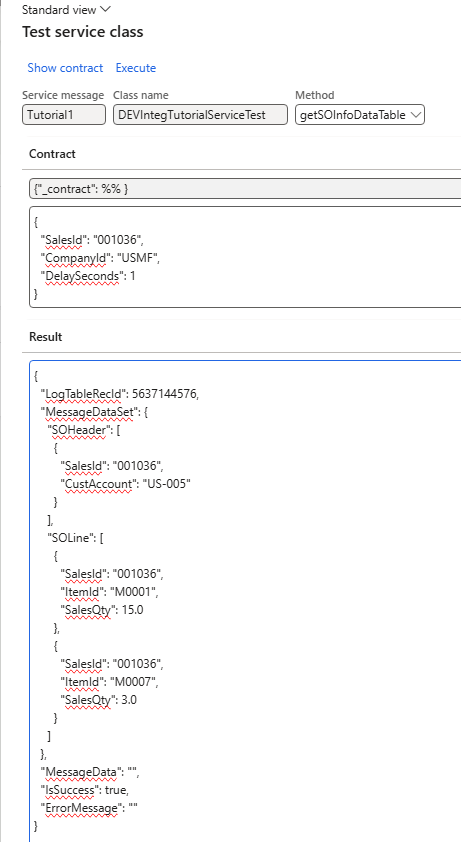
You can return several tables (call addDataTable again — the sample also returns the sales lines), or hand back a temp table directly with addTmpTable. The caller checks IsSuccess, reads ErrorMessage on failure, or deserializes MessageDataSet into a System.Data.DataSet on success.
Configure, test, and log
Register and test
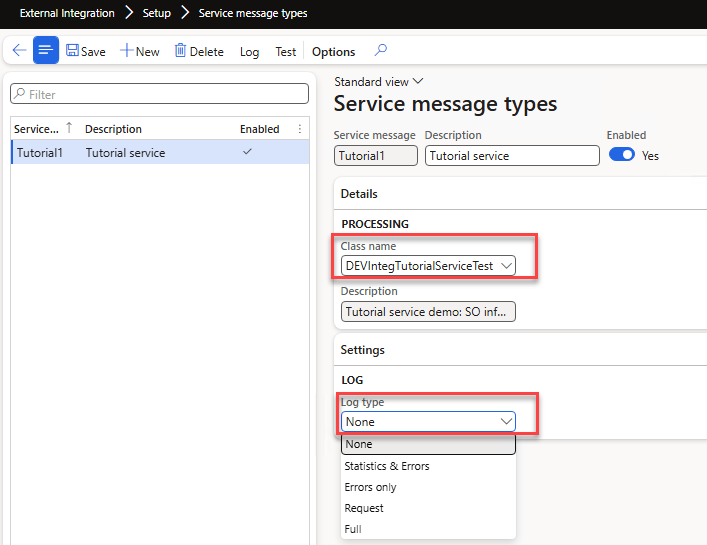
Add the class in Service message types and pick a Log type:
The Test button opens the Service test form, which auto-builds an empty input contract — fill in the parameters, press Execute, and read the response, no external tools needed:
Logging
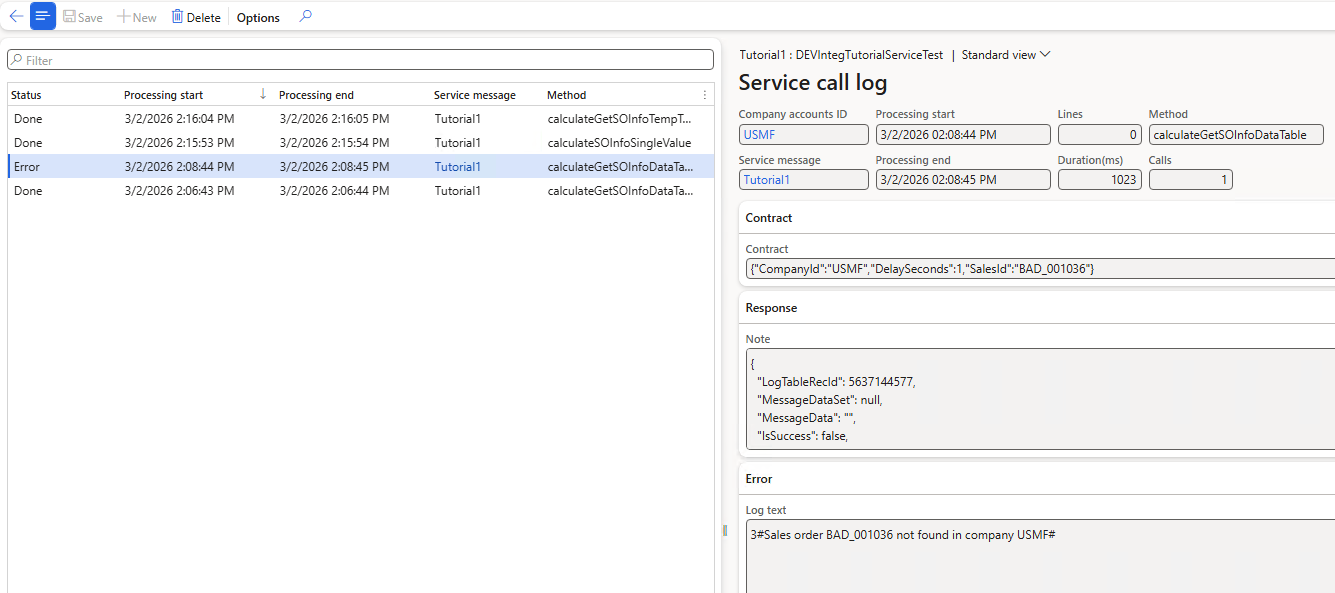
Every call can be written to the Service call log at the level set on the message type:
| Log type | What it records |
|---|---|
| None | Nothing |
| Statistics & Errors | One daily summary per method (calls and lines), plus full detail for failures |
| Errors only | Failed calls only |
| Request | Every call: parameters, status, timing, line count |
| Full | Request, plus the response payload (uses more storage) |
Request or Statistics & Errors are the usual production choices.
Tutorial
- Implement service-based integration in D365FO — the design rationale, the full sample (dataset and temp-table variants), consuming the service through Azure API Management, and the logging options.