vs Data Events
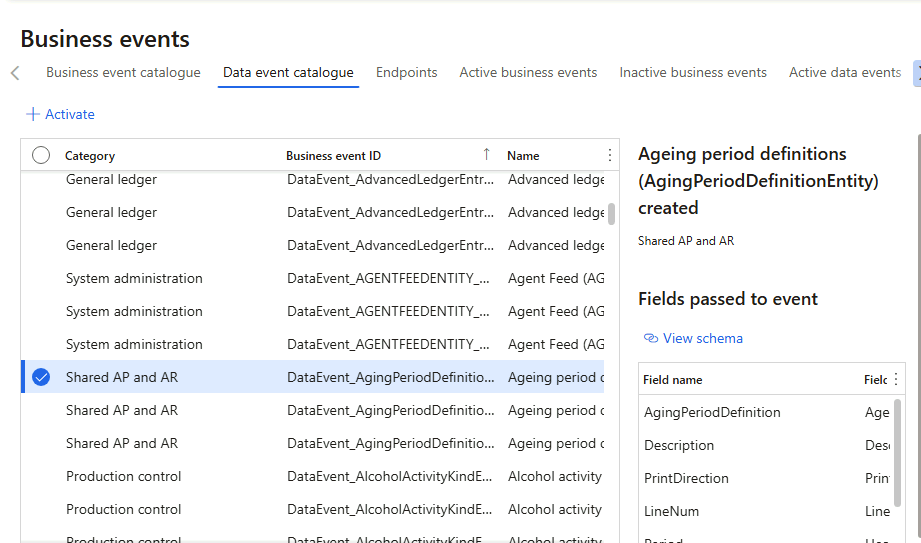
Data events are a standard D365FO feature for subscribing to create, update, and delete operations behind a data entity. Activate an entity in the Data event catalogue, and D365FO prepares a message containing the entity data when a related record changes:
Measuring the performance impact of data events
Test scenario: activate the update event for the Released Products V2 entity, then use Trace Parser while updating 100 InventTableModule records in one transaction.
ttsbegin;
while select forupdate inventTableModule
    order by inventTableModule.ItemId
{
    inventTableModule.Price += 1;
    inventTableModule.update();
}
ttscommit;
Inside each update
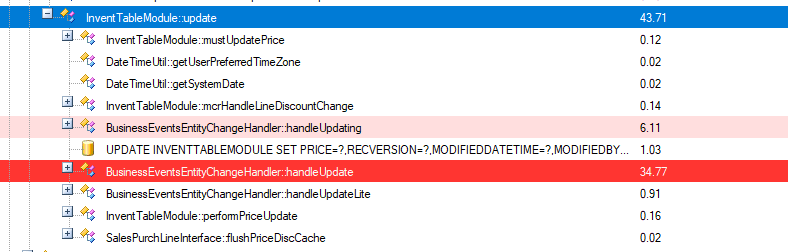
One row update in the call tree:
| Step | Time |
|---|---|
The actual UPDATE statement | ~1 ms |
BusinessEventsEntityChangeHandler::handleUpdating (pre-write) | ~6 ms |
BusinessEventsEntityChangeHandler::handleUpdate (post-write) | ~35 ms |
Complete InventTableModule.update() call | ~43 ms |
A 1 ms database update becomes a ~43 ms application update — around 40 times slower before D365FO sends anything to the target endpoint.
Pre-commit processing extends the transaction
The per-record handlers are not the only cost. For the transaction containing 100 updates, ttsNotifyPreCommit takes approximately 19.6 seconds:
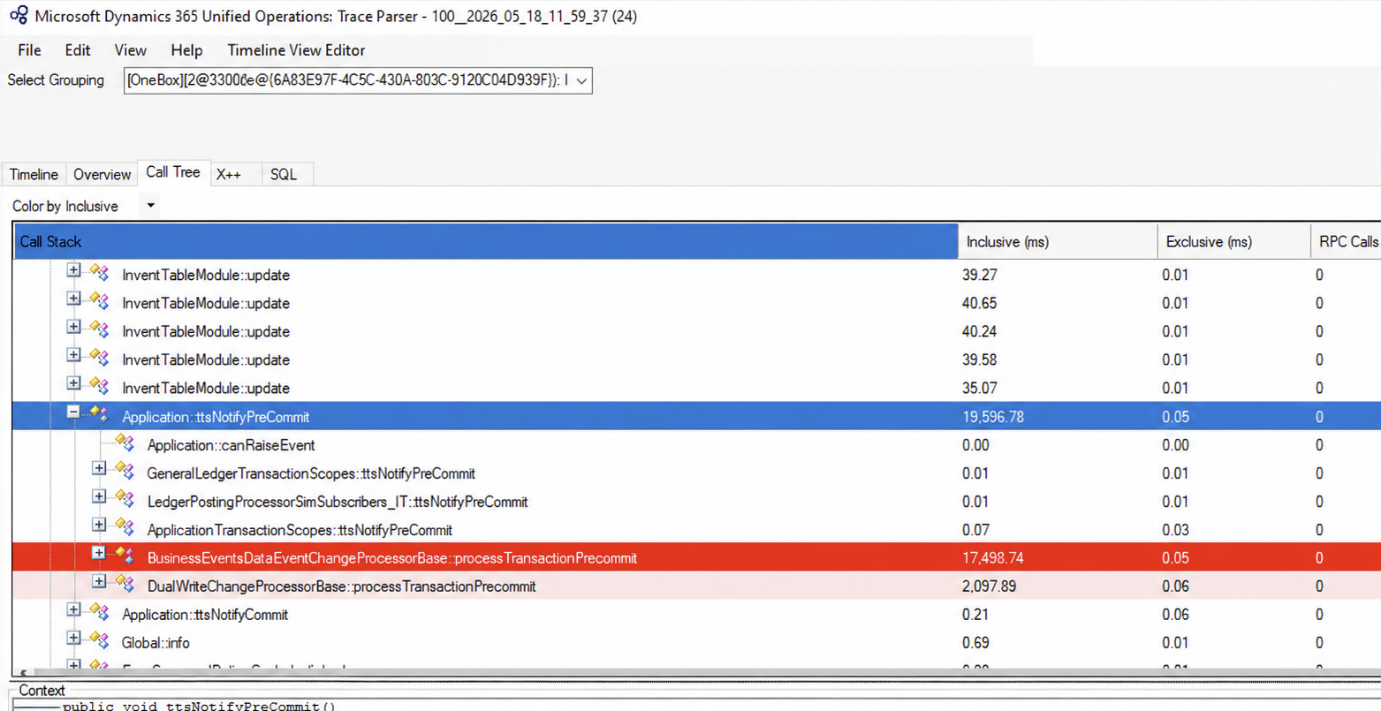
BusinessEventsDataEventChangeProcessorBase::processTransactionPrecommit accounts for 17.5 seconds of that time.
This delay also extends lock duration. Data Events and dual-write pre-commit processing run after work that includes the InventSum update. Adding seconds at this stage keeps database locks active longer and can block other users or batch processes working with the same items.
Filtering is limited
Once a data event is active, its cost applies to every update of every table behind that entity. Company-specific events can be restricted by legal entity, but there is no source-side field filtering (track only selected fields) or record filtering (track only a subset of records). Filtering a message at the endpoint does not remove the work already performed in the D365FO transaction.
External Integration: an alternative way to publish D365FO changes
The Outbound Event-based message type covers the same "publish a change" requirement with the filtering and visibility that data events lack:
Typical uses include publishing changes to complex master data such as customers and vendors, or exporting documents after a business operation.
-
You write the condition. A
DataEventHandler— or any other insert point — decides what qualifies. Comparing againstorig()gives field-level filtering; any other check on the record gives record-level filtering:[DataEventHandler(tableStr(PurchTable), DataEventType::Updated)]public static void PurchTable_onUpdated(Common sender, DataEventArgs e){PurchTable purchTable = sender as PurchTable;if (purchTable.DocumentState == VersioningDocumentState::Confirmed &&purchTable.orig().DocumentState != purchTable.DocumentState) // only this change, only these records{DEVIntegTutorialExportPurchOrder::construct().insertFromPurchTable(purchTable);}} -
The transaction stays fast. All that happens inside it is one row inserted into the Export document log with status To send. Building the payload, calling the service, and processing the response all happen after the transaction — in the user session or in a batch job.
-
Every document has a single status. Each document has one log row, and another qualifying update reuses it and sets the status back to To send. The payload is built at export time from the current data. Users can see the send status, history, attempts, and message body when full logging is enabled. A data event provides no equivalent view.
-
Any target and any format. Azure Service Bus, a REST/SOAP service, or a file — with the payload you build, not the entity schema.
| Capability | Data Events | External Integration |
|---|---|---|
| Impact on the source transaction | Event processing runs inside each update and again during pre-commit, extending the source transaction time | ✅ One insert into a log table; the payload is built and sent after the transaction |
| Field-level (horizontal) filtering | Not available — any field change raises the event | ✅ Your X++ condition decides which field changes matter |
| Record-level (vertical) filtering | Not available — every record of the table | ✅ Any condition on the record, including company and status |
| Per-record visibility | No status per record | ✅ One Export document log row per document — status, history, retries |
| Delivery order | One message per event; delivery order is not guaranteed | ✅ Repeated updates reuse one log row; the payload built at export time contains the current data |
| Payload | Fixed entity schema | ✅ Any format you build in X++ |