vs Data Management Framework (DMF)
DMF was introduced as a data import/export mechanism: data migration, copying configuration between environments, ad-hoc extracts. Microsoft later added recurring integrations, which expose a DMF project through an API so an external scheduler can push files into it and pull results back. That turns DMF into something that can be used for integration.
For document-based interfaces the issues below are hard to work around, because they come from the design of DMF itself.
Issues with DMF as an integration tool
The points below come out of a typical integration approach discussion, where someone takes the "just use DMF, you get everything out of the box" position.
No transaction control, so multiline documents import half-way
DMF cannot run inside a transaction. DmfEntityWriter.write() rejects it outright:
if (appl.ttsLevel() > 0)
{
    throw error("@DMF:DMFWriterTTSLevelInvalid");
}
So if a file contains a 10-line journal and 2 lines fail validation, you get a journal with 8 lines and no way to make the document all-or-nothing. Someone then has to find the partially imported document, work out which lines are missing, and decide whether to fix or delete it — for every failure, forever.
With External Integration, transaction scope is your decision in the processing class: per message, per document, or per line.
The original file name is lost
Recurring integrations and the Batch API do not carry the source file name through — in D365FO you see a message GUID instead. Troubleshooting an interface mostly means answering "what happened to this file?", and that question becomes much harder when the file name only exists on the sending side.
With External Integration, the file name is on the message, and the file itself is linked with it.
The scheduler lives outside D365FO
There is no out-of-the-box runner for recurring integrations — something external has to call the API on a schedule: the Recurring Integrations Scheduler (RIS), a Logic App, or your own service. That is a second application to develop, deploy, and support: its own source control and branching, its own deployment procedure, a step in every new-environment setup, coordinated downtime, and its own handling of D365FO throttling. The visible symptom is that standing up a new environment with working integrations takes days.
With External Integration, the schedule is a standard D365FO batch job and all the logic lives in the same model as the rest of your code.
Entity logic is not the logic the user sees
Data entities run their own business logic, separate from the logic behind the forms and tables. DMF supports only data entities, so you can end up with a user reporting "I created the same journal manually with the same values and these fields were filled in — why not from the import?"
Standard entities are also hard to use as interfaces. Sales lines are the clearest example: five versions plus the CDS ones, each adding more than a thousand lines of custom logic that is used nowhere outside that entity.
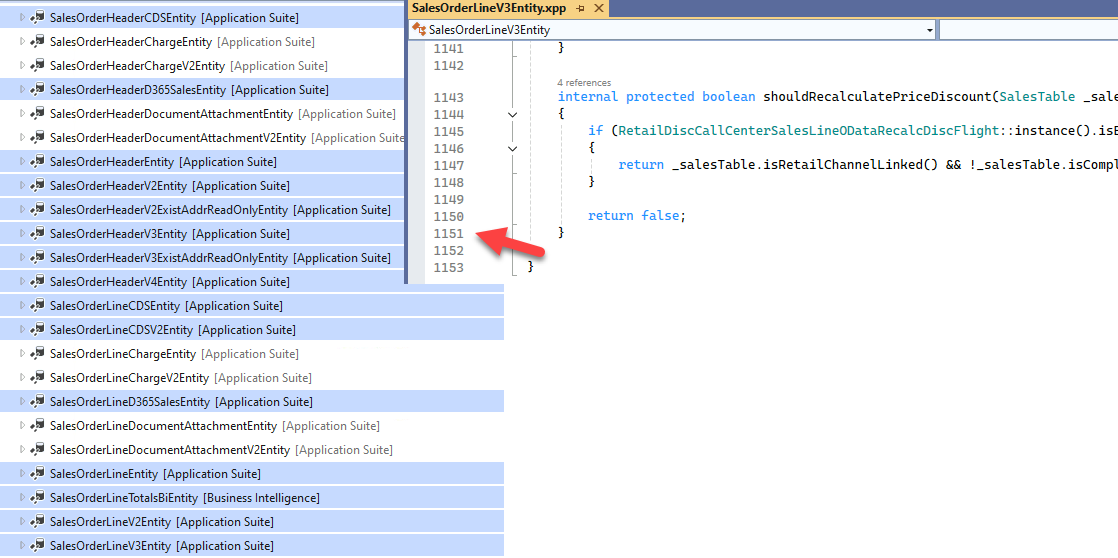
Even Microsoft's own guidance is not "reuse the standard entity": for a specific integration it recommends building a purpose-built lightweight entity rather than using a complex standard one such as CustomersV3. So the entity layer is rarely free, even in the DMF approach.
With External Integration you choose per interface: tables and API classes when the result must match what a user gets manually, or a data entity when you want it to behave like a standard import.
Microsoft's own modules do not use DMF
It is also worth looking at what Microsoft ships:
- Warehouse management mobile app — a custom service, not DMF.
- Field Service integration — built on the
SysMessageProcessorframework (vs Message Processor). - Export to Data Lake — the original version was based on data entities, ran into serious problems with incremental export, and was replaced by per-table export in Synapse Link.
- Dual Write and Data Events — their own entity-based mechanism, and it comes with a large performance hit (vs Data Events).
How External Integration solves it
Take a typical scenario: an external system drops ledger journal files (CSV/Excel) into a shared location several times a day. Journals must be created and posted, and accountants must be able to investigate any failure themselves.
The processing class decides the transaction scope, the original file is attached to the message, and all four typical error types — connection, file format, data, and posting errors — surface in one Incoming messages form with staging data for review. No component outside D365FO is involved.
| Capability | DMF | External Integration |
|---|---|---|
| Custom transaction control (per message, per journal, per line) | Not supported — DmfEntityWriter fails inside a transaction | ✅ Fully controlled in the processing class |
| Link a created document to the original file | Not available out of the box; the file name is not carried through | ✅ File name on the message, payload attached |
| Custom business logic | Tied to data entities | ✅ Plain X++ — tables, API classes, or entities |
| Scheduling and ALM | External scheduler (RIS, Logic App) to develop and deploy separately | ✅ Standard batch job, same model, same deployment |
| Error handling | Varies by entity | ✅ A standard approach to error types (connection, format, data, posting) |
Example: File-based integration for ledger journals — includes a walk-through of each error type and how a user recovers from it.
Performance is comparable to raw DMF batch imports: the framework's parallel processing imported 1 million journal lines in a standard test. Evidence: Periodic import of one million ledger journal lines.
When DMF is still the right choice
A quick prototype, or an integration where a user manually validates the results. See also the DMF file format and the multicompany DMF tutorial.
For document processing there is a middle option seen in practice: import the files with DMF into custom staging tables and implement the processing on top of those tables. That works, but it means building your own logging, error handling, and reprocessing — which is what External Integration already provides.